About Sound Devices Wingman
Gain convenient remote control of your Sound Devices 688, 664, and 633 mixer/recorders plus MixPre and MixPre II Series recorders with Wingman, a free iOS-based application. Wingman provides clear views of metering and...
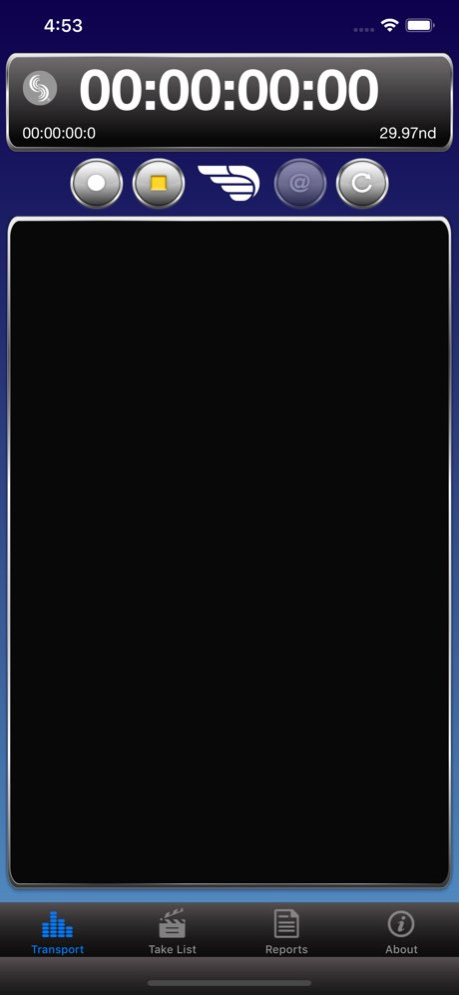
Gain convenient remote control of your Sound Devices 688, 664, and 633 mixer/recorders plus MixPre and MixPre II Series recorders with Wingman, a free iOS-based application. Wingman provides clear views of metering and timecode display on the larger screens of iOS smartphones and tablets. The touchscreen interface is easy to use and provides fast remote-control access to key 6-Series and MixPre Series functionality. With Wingman, users can view meters, start and stop audio recordings, enter and edit metadata, as well as arm/disarm, and rename tracks. Additionally on the 6-Series, Circle a take or designate False takes with the touch of a fingertip. Create sound reports quickly, and instantly email them directly from your iPhone or iPad. The Sound Devices WM-Connect hardware accessory is required to operate the 6-Series mixer/recorders with the Wingman app. This accessory is not required for the MixPre Series which have built-in Bluetooth LE. WM-Connect can be purchased separately from an authorized Sound Devices reseller:
Version History Fixed a crash when using Sound Reports on some iOS versions. 5.04 11/29/2023 Support for MixPre-3 and MixPre-3 II with the +2 Channel Plug-In 5.03 10/31/2023 Wingman 5.02 -Wingman app now works correctly with iOS 9 devices. -Display issues with File/Take Lists following system boot up have been corrected. 5.02 12/11/2019 Wingman 5.01 - Fixed Metadata editing display issues with select iOS devices running iOS 13 no longer occur. MixPre no longer crashes when a Wingman False Take command is received with no files in the File List. 5.01 12/04/2019 Wingman v5.00 Sound Reports are now available for MixPre-3/II and MixPre-6/II. MixPre recorded files no longer show 00:00:00:00 timecode and duration values in the Wingman Take List. Track arm indicators no longer flicker green during playback in music projects. Rare application crash when splitting recording no longer occurs. Various display fixes for iOS Dark Mode. 5.00 11/26/2019 Wingman v4.00 Added support for the MixPre II Series. 4.00 08/30/2019 New Support for MixPre-3M, -6M, and -10M. Support for MixPre-3, -6, and -10T running Musician Plugin. Support for MixPre-6 and -10T running Ambisonics Plugin. Changes Multichannel linking status is now shown by track indicators. Fixed Various under the hood improvements. 3.20 12/10/2018 New Ability to create, edit and email sound reports for the MixPre-10T. Changes iPhone X Safe Area is now implemented requiring that iOS 8 and earlier are no longer supported. Use iOS 9 or higher. Support for 20 character MixPre filename lengths. Fixed Meters that are not allowed to be named appeared to be editable e.g. 633 X3 and X4. iOS 11 was not notifying users that Bluetooth was disabled when Wingman was launched. Missing 'media not present' notification when Wingman record button was pressed without an SD card inserted. Incorrect number of tracks were displayed for the Next Take. (MixPre-10T) Jumping between metadata fields improved. Bluetooth disconnection improved when in the track naming screen Various display issues with iPhone X. 3.10 06/06/2018 Improved reliability and performance with iOS 11. 3.01 09/27/2017 Changes: Wingman now prevents the mobile device from going to sleep when application is active. Various system improvements and enhancements. Fixed: MixPre-3 and MixPre-6 Camera Return Meters do not display meter activity. Application crashes when entering Sound Reports page with a custom Date entry. Parentheses are incorrectly prohibited in Sound Report Info/Phone and Prod. Co Tel fields. Minor text changes to MixPre-3 and MixPre-6 related dialog boxes. When offline, the Take List (File List for MixPre-3/6) was incorrectly displaying “Loading…” 3.00 06/14/2017 Support for Sound Devices MixPre-3 and MixPre-6 Recorders Optional password-protected remote control of the 6-series mixer/recorders Optional password-protected remote control of the new MixPre-3 and MixPre-6 recorders Landscape orientation for iPad Various other fixes and improvements 2.00 04/20/2017 Wingman v1.01 Change List Fixed: • Wingman meter response is sluggish when WM-Connect is connected to the CL-12 Keyboard port. • Wingman display and metadata errors with 6-Series after the app has been brought in and out of Standby Mode. • iPad Pro 12.9” minor display issue in the Devices Found page. • Track Arming display inconsistencies. Notes: Requires updating the 6-Series mixer to v4.01. It is important that the 6-Series mixer is running v4.01 and the Wingman iOS app is running v1.01 before launching the app. 1.01.00 10/18/2016 1.0 09/07/2016
Previous Versions
Here you can find the changelog of Sound Devices Wingman since it was posted on our website on 2016-09-26 19:02:09.
The latest version is 5.04 and it was updated on 2026-10-09 09:46:57. See below the changes in each version.
Sound Devices Wingman version 5.04
Updated At: 2026-10-08
Changes: Version History Fixed a crash when using Sound Reports on some iOS versions. 5.04 11/29/2023 Support for MixPre-3 and MixPre-3 II with the +2 Channel Plug-In 5.03 10/31/2023 Wingman 5.02
-Wingman app now works correctly with iOS 9 devices.
-Display issues with File/Take Lists following system boot up have been corrected. 5.02 12/11/2019 Wingman 5.01 - Fixed
Metadata editing display issues with select iOS devices running iOS 13 no longer occur.
MixPre no longer crashes when a Wingman False Take command is received with no files in the File List. 5.01 12/04/2019 Wingman v5.00
Sound Reports are now available for MixPre-3/II and MixPre-6/II.
MixPre recorded files no longer show 00:00:00:00 timecode and duration values in the Wingman Take List.
Track arm indicators no longer flicker green during playback in music projects.
Rare application crash when splitting recording no longer occurs.
Various display fixes for iOS Dark Mode. 5.00 11/26/2019 Wingman v4.00
Added support for the MixPre II Series. 4.00 08/30/2019 New
Support for MixPre-3M, -6M, and -10M.
Support for MixPre-3, -6, and -10T running Musician Plugin.
Support for MixPre-6 and -10T running Ambisonics Plugin.
Changes
Multichannel linking status is now shown by track indicators.
Fixed
Various under the hood improvements. 3.20 12/10/2018 New
Ability to create, edit and email sound reports for the MixPre-10T.
Changes
iPhone X Safe Area is now implemented requiring that iOS 8 and earlier are no longer supported. Use iOS 9 or higher.
Support for 20 character MixPre filename lengths.
Fixed
Meters that are not allowed to be named appeared to be editable e.g. 633 X3 and X4.
iOS 11 was not notifying users that Bluetooth was disabled when Wingman was launched.
Missing 'media not present' notification when Wingman record button was pressed without an SD card inserted.
Incorrect number of tracks were displayed for the Next Take. (MixPre-10T)
Jumping between metadata fields improved.
Bluetooth disconnection improved when in the track naming screen
Various display issues with iPhone X. 3.10 06/06/2018 Improved reliability and performance with iOS 11. 3.01 09/27/2017 Changes:
Wingman now prevents the mobile device from going to sleep when application is active.
Various system improvements and enhancements.
Fixed:
MixPre-3 and MixPre-6 Camera Return Meters do not display meter activity.
Application crashes when entering Sound Reports page with a custom Date entry.
Parentheses are incorrectly prohibited in Sound Report Info/Phone and Prod. Co Tel fields.
Minor text changes to MixPre-3 and MixPre-6 related dialog boxes.
When offline, the Take List (File List for MixPre-3/6) was incorrectly displaying “Loading…” 3.00 06/14/2017 Support for Sound Devices MixPre-3 and MixPre-6 Recorders
Optional password-protected remote control of the 6-series mixer/recorders
Optional password-protected remote control of the new MixPre-3 and MixPre-6 recorders
Landscape orientation for iPad
Various other fixes and improvements 2.00 04/20/2017 Wingman v1.01 Change List
Fixed:
• Wingman meter response is sluggish when WM-Connect is connected to the CL-12 Keyboard port.
• Wingman display and metadata errors with 6-Series after the app has been brought in and out of Standby Mode.
• iPad Pro 12.9” minor display issue in the Devices Found page.
• Track Arming display inconsistencies.
Notes:
Requires updating the 6-Series mixer to v4.01. It is important that the 6-Series mixer is running v4.01 and the Wingman iOS app is running v1.01 before launching the app. 1.01.00 10/18/2016 1.0 09/07/2016
Sound Devices Wingman version 5.04
Updated At: 2023-11-29
Changes: Nov 29, 2023
Version 5.04
Fixed a crash when using Sound Reports on some iOS versions.
Sound Devices Wingman version 5.04
Updated At: 2023-11-29
Changes: Fixed a crash when using Sound Reports on some iOS versions.
Sound Devices Wingman version 5.03
Updated At: 2023-10-31
Changes: Oct 31, 2023
Version 5.03
Support for MixPre-3 and MixPre-3 II with the +2 Channel Plug-In
Sound Devices Wingman version 5.02
Updated At: 2019-12-11
Changes: Dec 11, 2019 Version 5.02
Wingman 5.02
-Wingman app now works correctly with iOS 9 devices.
-Display issues with File/Take Lists following system boot up have been corrected.
Sound Devices Wingman version 1.0
Updated At: 2016-09-12
Sound Devices Wingman version 5.02
Updated At: 1970-01-01
Changes: 2019年12月11日 Version 5.02
Wingman 5.02
-Wingman app now works correctly with iOS 9 devices.
-Display issues with File/Take Lists following system boot up have been corrected.
Sound Devices Wingman version 5.02
Updated At: 1970-01-01
Changes: 11 de dic. de 2019 Version 5.02
Wingman 5.02
-Wingman app now works correctly with iOS 9 devices.
-Display issues with File/Take Lists following system boot up have been corrected.
Disclaimer
Official App Store Link
We do not host Sound Devices Wingman on our servers. We did not scan it for viruses, adware, spyware or other type of malware. This app is hosted by Apple and passed their terms and conditions to be listed there. We recommend caution when installing it.
The App Store link for Sound Devices Wingman is provided to you by apps112.com without any warranties, representations or guarantees of any kind, so access it at your own risk.
If you have questions regarding this particular app contact the publisher directly. For questions about the functionalities of apps112.com contact us.